
For you who employ your assistants yourself
Your own employer in personal assistance – without the paperwork
SjalvAssistans brings schedules, time reports, salaries, Skatteverket and Försäkringskassan together in one place. You stay in control. The system keeps track of the rules.
SEK 500 a month incl. VAT – however many assistants you have.
You start with BankID. No card and no commitment.

 Log in and sign with BankID
- The employer declaration straight to Skatteverket
- Time reports and invoices straight to Försäkringskassan
- Data stored within the EU
How it works
From schedule to salary, month after month
Everything is connected. The schedule becomes time reports, and the time reports become salaries and reporting. You check and approve – the system does the sums.
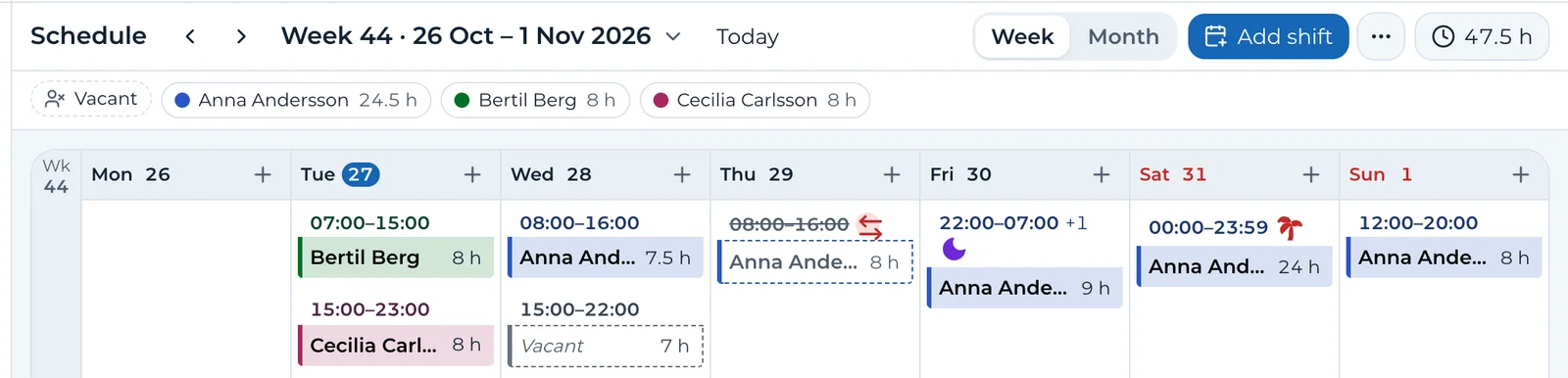
Plan the schedule
Plan week by week or with templates that repeat. The hours count against Försäkringskassan's decision, and the Working Hours Act is checked while you plan.
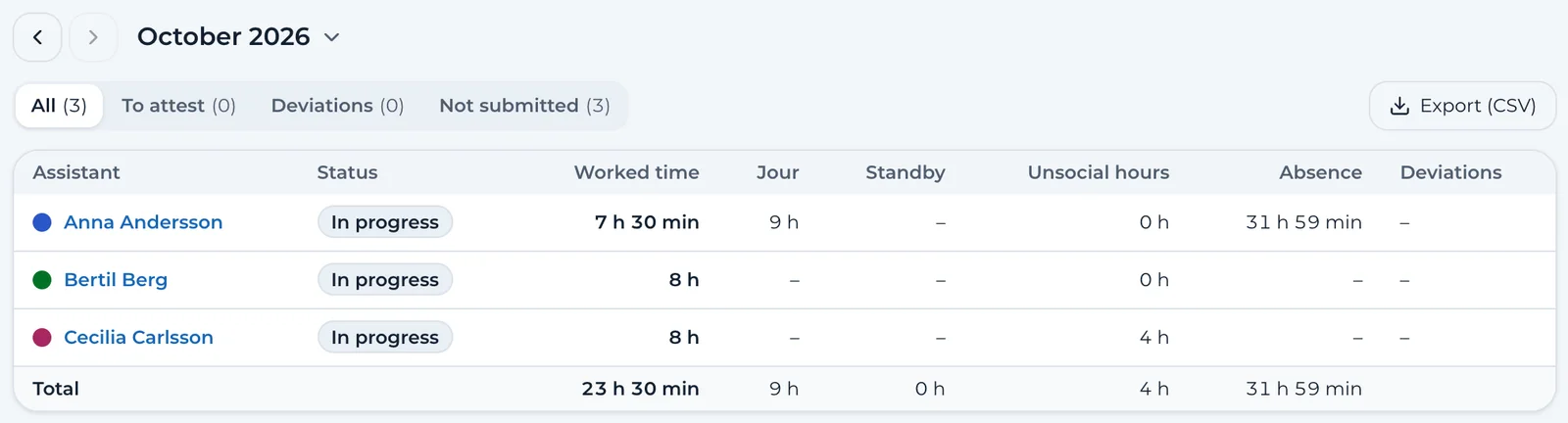
Assistants report their time
The time report is made from the schedule. The assistant adds any changes and submits it. You approve, and the month is locked.
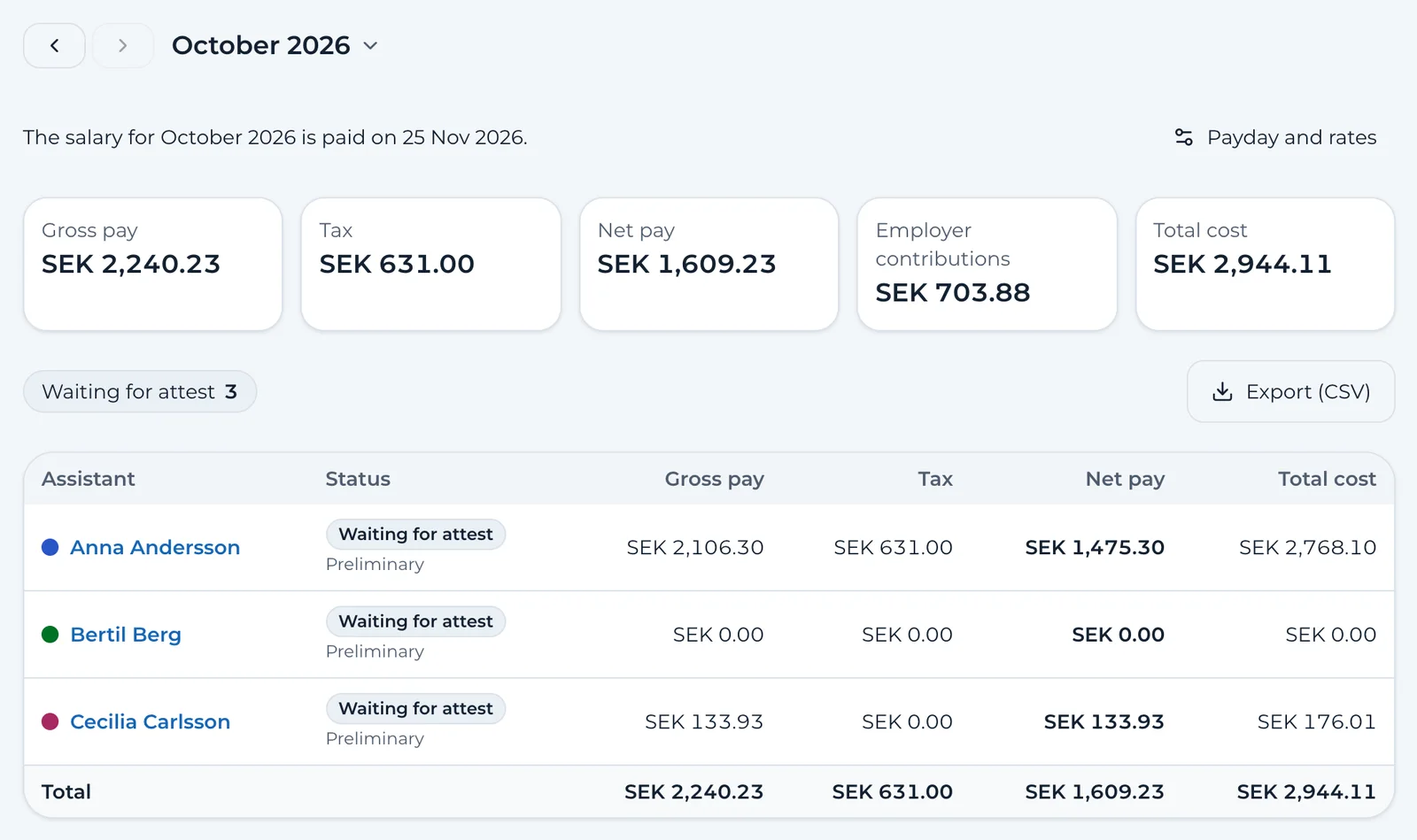
Salaries and reporting
Salaries are worked out with tax tables, unsocial-hours pay, holiday pay and employer contributions, and the employer declaration goes to Skatteverket. The time report and the invoice go to Försäkringskassan from the same month.
The Working Hours Act
The warning comes while you plan – not afterwards
Every shift you add is checked against rest and working time. You see the problem before anyone has worked too much, and what it could cost.
Checked in the shift itself
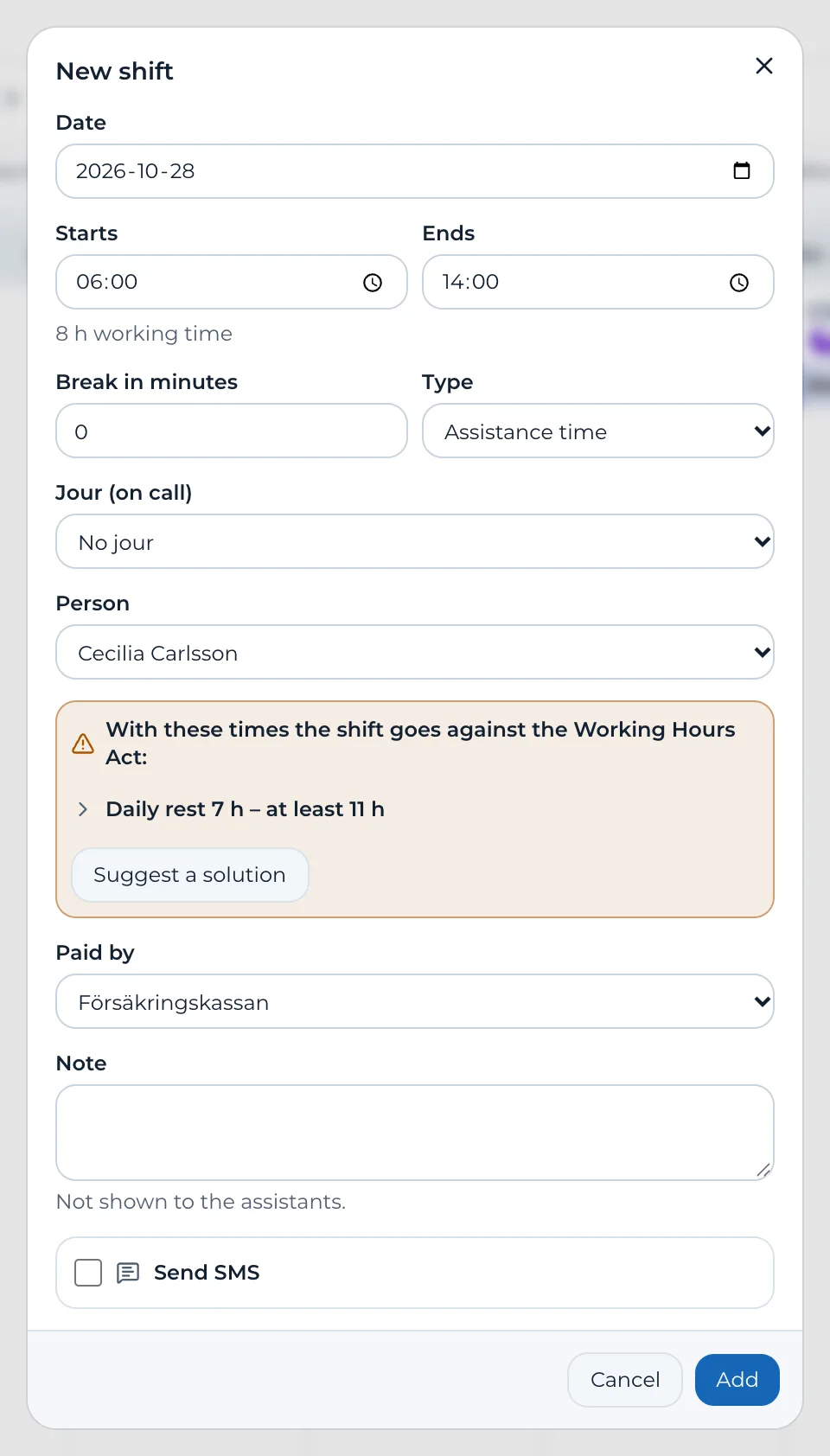
If the times go against the law, the form says so. Suggest a fix offers another time, or a colleague without a warning.
The whole month in one line
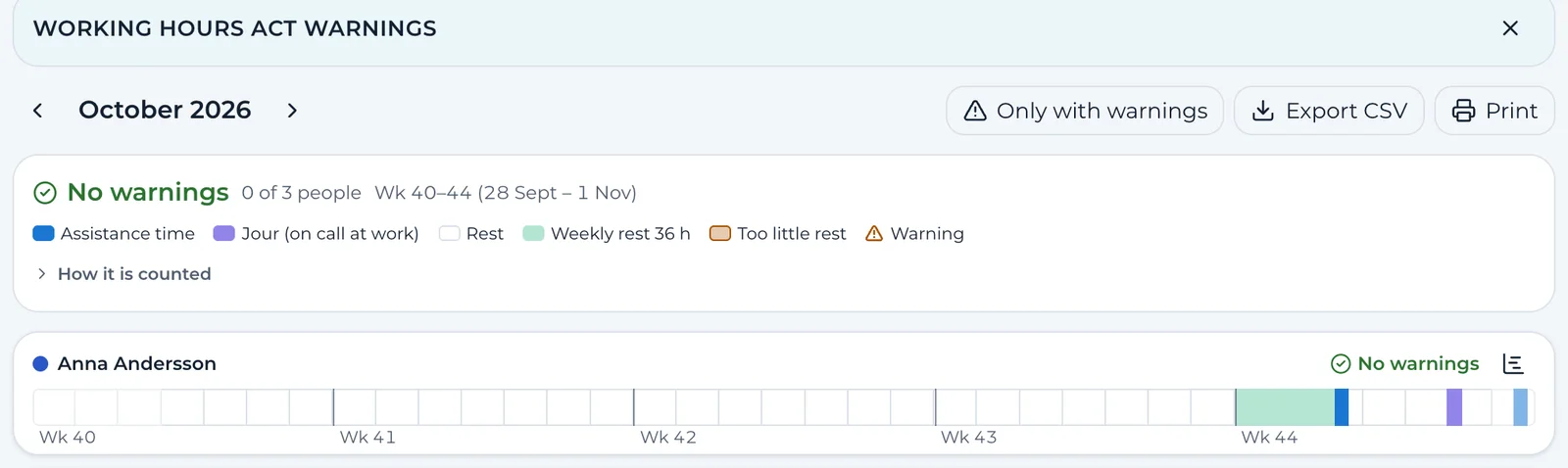
Each person's work and rest as a strip, with the warnings marked. Only those who plan see them – assistants see no warnings.
What a breach could cost
Worked out under the law that applies to you: the Working Hours Act when the employer is a company, the act on working hours in domestic work when the employer is a private person.
Acknowledge and compensate
Acknowledge a warning with a note and plan compensatory rest. Everything is kept, so you can show how you handled it.
Everything included
One system for all of your assistance
Everything is in the price. No modules to buy on top.
Schedules and templates
A running schedule by week and month with drag and drop. Templates that repeat, on-call time inside shifts, vacant shifts, availability and swapping assistants. Everyone gets their own schedule, by text message and calendar link.
- Running schedule
- Templates
- On-call time
- Vacant shifts
- Availability
- Swap assistant
- Send schedules
- Calendar link
Salaries and bank file
Salaries are worked out from the approved time report, with tax tables, employer contributions, unsocial-hours pay under the collective agreement, holiday pay, sick pay and on-call pay. Payslips in the app and a salary file for the bank.
salary-file-october.xml · ISO 20022Skatteverket
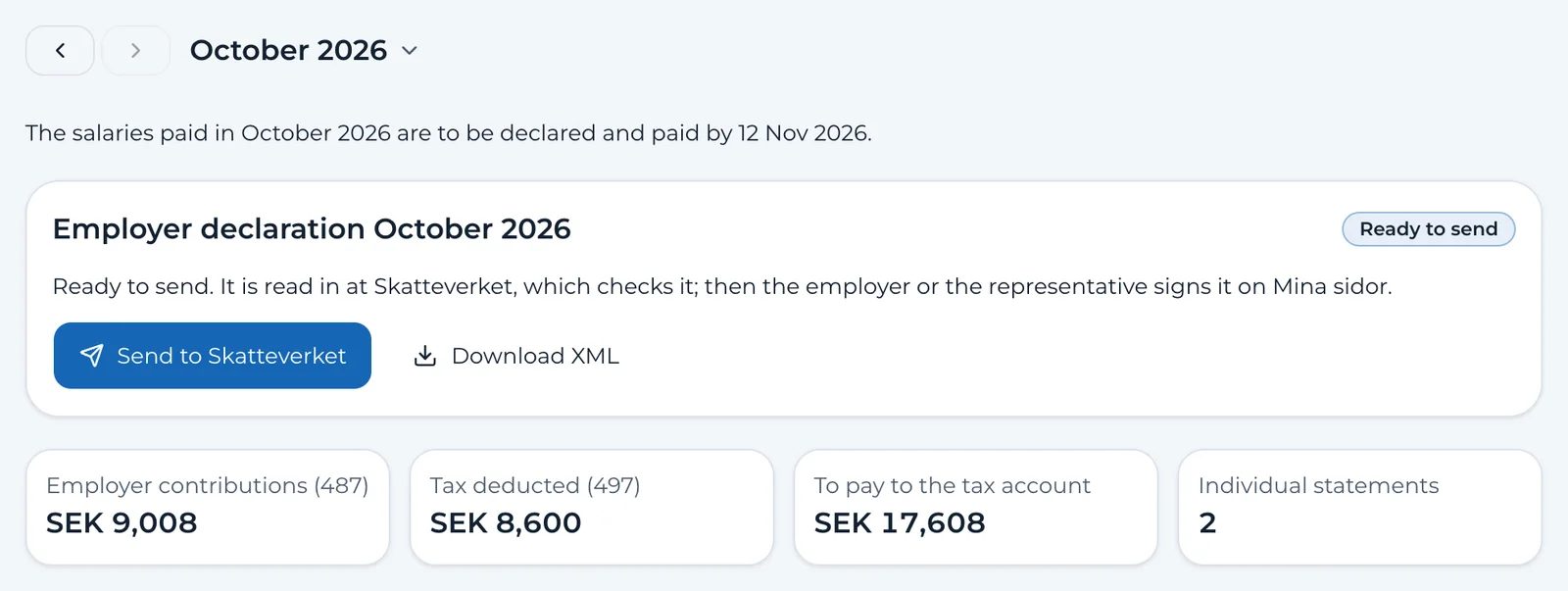
The employer declaration is made from the approved salaries and sent to Skatteverket, the Swedish Tax Agency. You sign it on its website.
Finances
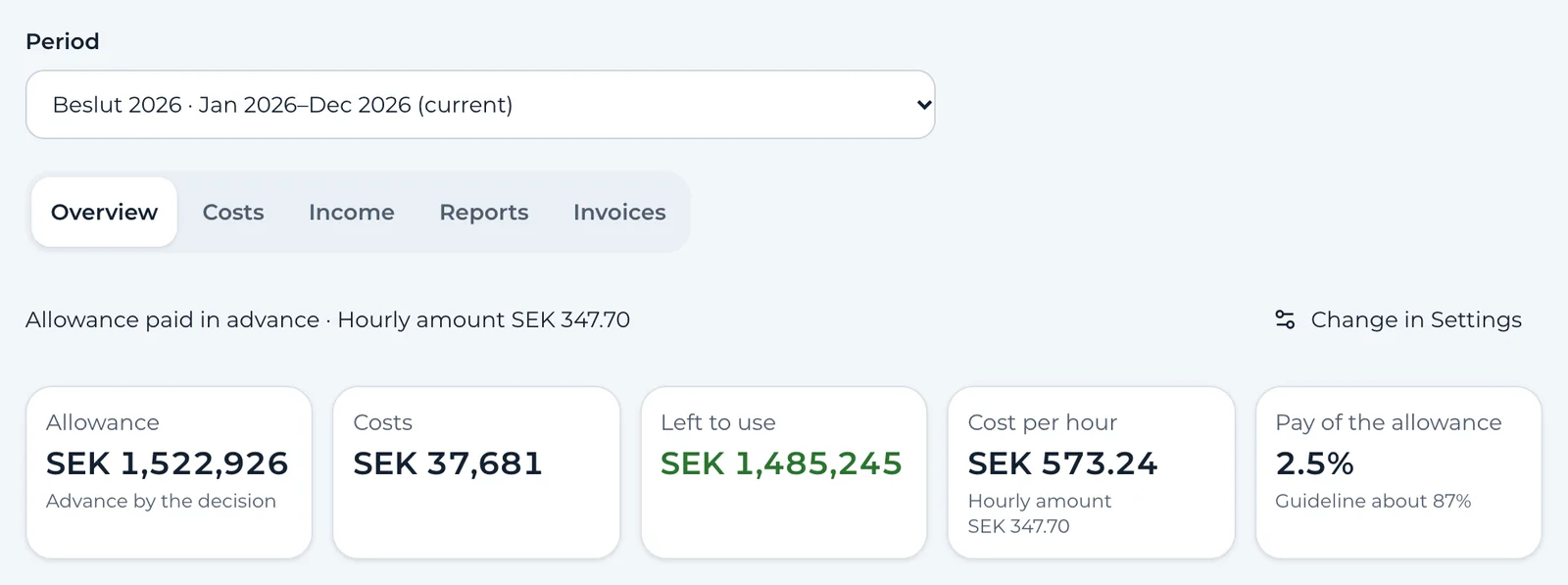
The funding coming in, costs by category, receipts, budget and forecast. A surplus can be paid out as salary, and the cost report and the guardian's annual account are produced for you.
Försäkringskassan
The time report is signed with BankID by the assistant and you and sent electronically. The invoice is sent from the same month, and new assistants are reported electronically too.
Contracts with BankID
The employment contract is made from what the system already knows and signed with BankID by you and the assistant.
Absence
Sickness, care of a sick child and leave: requests, decisions and replacements in the schedule.
Journal and incidents
Notes for each shift, health readings and incidents with handling and history – for the team around the person only.
Messages, Drive and certificates
Write to the whole team, share files in folders and let assistants order employment certificates.
Help on every page
Guides for every page and task, and Ask support straight from the app.
- Log in with BankID
- Roles for employer, guardian, administrator, team leader, assistant and provider
- The app for iPhone and Android, and the web on your computer and tablet
- In Swedish and English
The app
SjalvAssistans on your phone – for the whole team
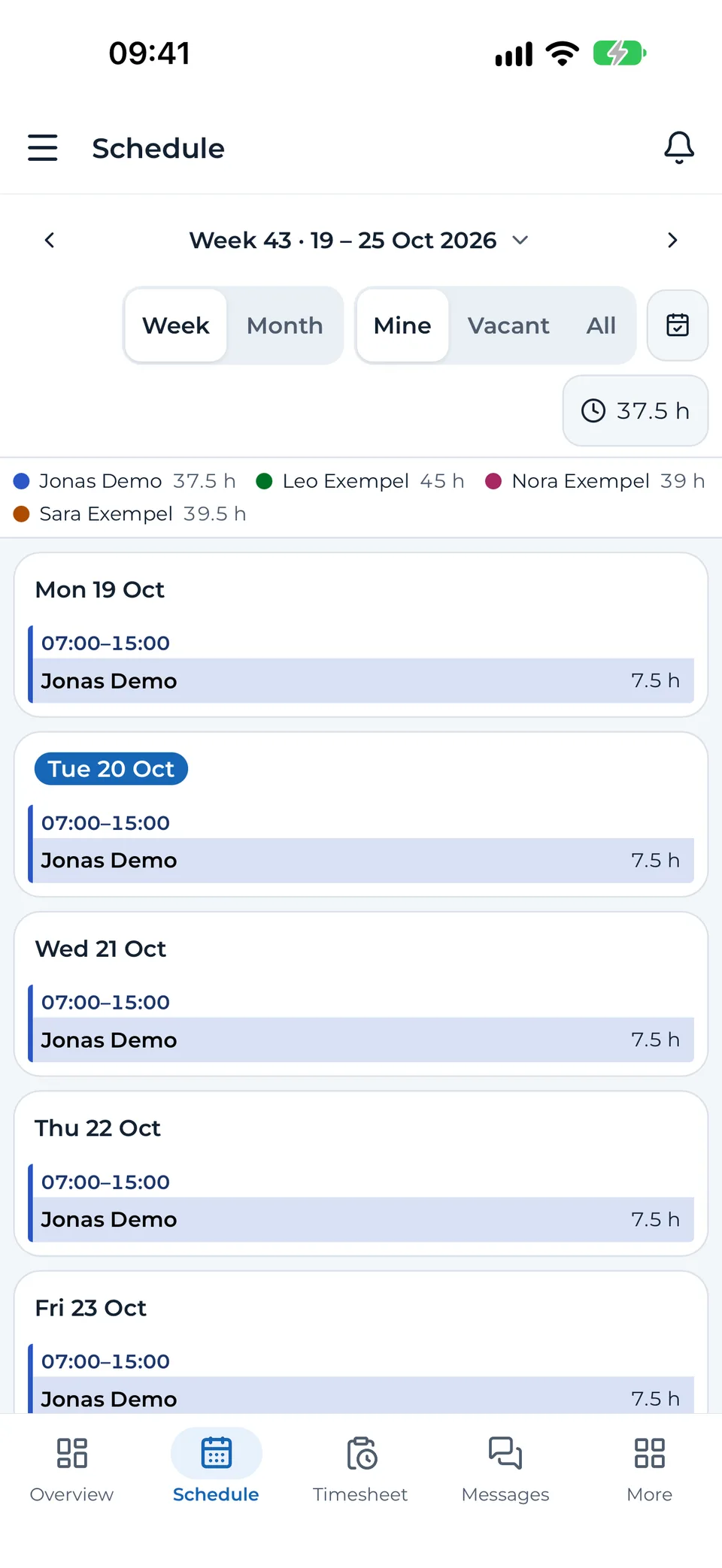
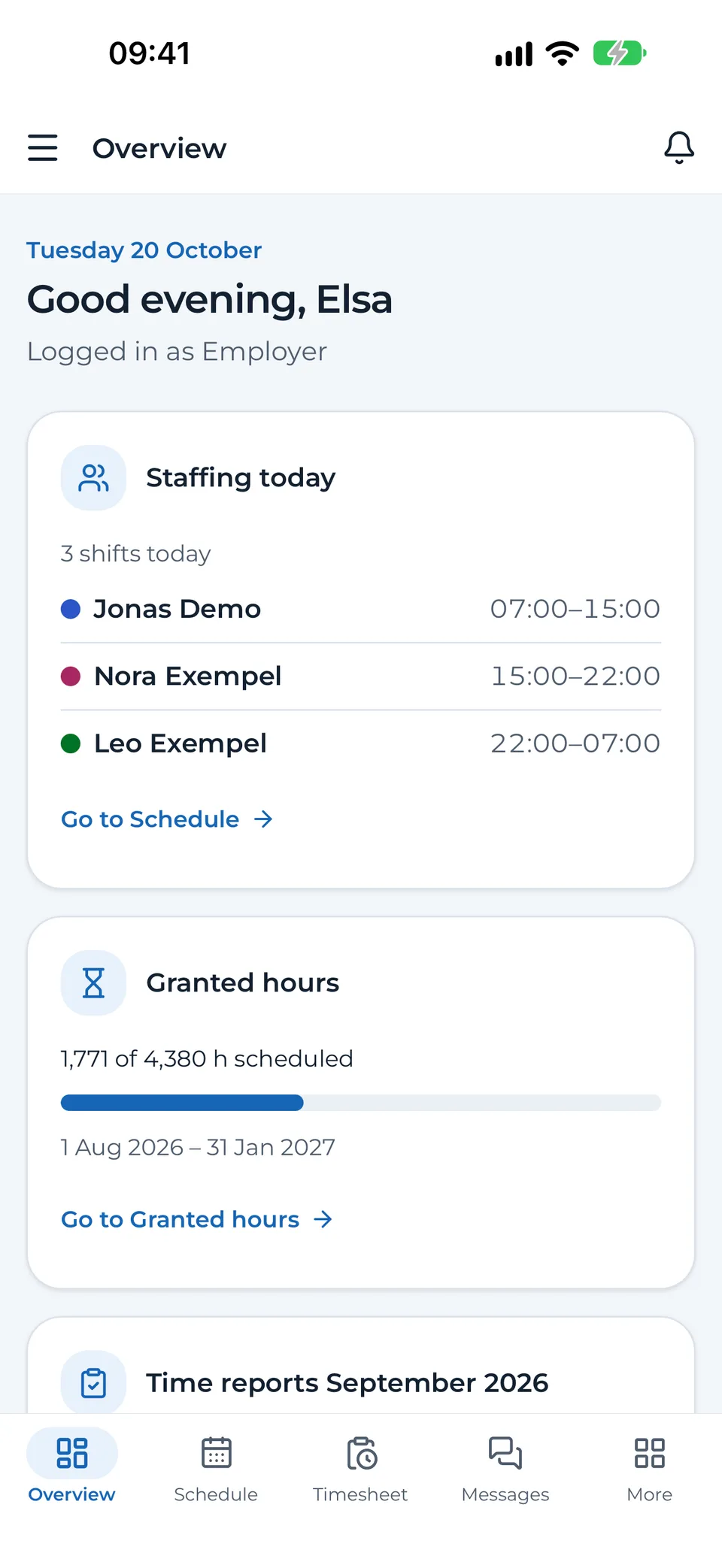
The app is free for iPhone and Android. Assistants see their shifts and submit their time report, and you approve, decide and reply wherever you are.
Download the app for free
Scan the code with your phone's camera and the right store opens.


You start the trial here on the web. Then you and your assistants log in to the app – send them the link sjalvassistans.se/en/app.

Notifications when something happens
A leave request, a submitted time report, a changed shift or a new message. Everyone chooses which notifications they want.
Today's shifts on the home screen
The widget shows today's shifts and the next one, without opening the app.
BankID and Face ID
Log in with BankID on the same phone or with a QR code. The app locks with Face ID, a fingerprint or the phone's passcode.
The same data as on the computer
Schedule, time reports, absence, journal, messages and payslips. What you do in the app shows on the web at once.

Try it side by side
Don't switch all at once. Compare first.
Keep your current assistance company and put the same month into SjalvAssistans during the 30 free days. We read the schedule in for you – as a PDF, Excel, CSV or screenshot.
- Excel
- CSV
- Screenshot
Export one month
Take a month's schedule from your assistance company or your system as a PDF, Excel or CSV file – or take a screenshot.
Drop the file into SjalvAssistans
The schedule is interpreted with AI, but first every name is replaced by a code – no names leave our servers.
Review before anything is saved
You see every shift against the schedule and the Working Hours Act, and choose who each name is. Undo removes the import in one click.
What one month lets you check
- That the schedule follows the Working Hours Act – daily rest, weekly rest and working hours – with warnings under the collective agreement's rules.
- What each assistant should be paid under the collective agreement, with unsocial hours, on-call, overtime and holiday pay, so you can compare with the payslips from your assistance company.
- How the hours count against Försäkringskassan's decision.
Pricing
One price. Everything included.
You pay for the person who has assistance – not per assistant or user.
SjalvAssistans
SEK 500/ month
- Unlimited assistants and users
- All features: schedules, time, salaries, finances and the authorities
- Help centre and support in the app
- No start-up fee and no commitment
- 30 days free – you start with BankID
What is SEK 500 in the economics of assistance?
A common rule of thumb is that 5–8 % of the assistance funding goes to administration. With 100 granted hours a week and the 2026 standard rate of SEK 347.70 an hour, that is roughly SEK 7,500–12,000 a month.
No payroll bureau or accountant
Salaries with tax deductions and employer contributions, the employer declaration, the time report and invoice to Försäkringskassan, the cost report and the guardian's annual account are produced by the system from the same month. What you would otherwise pay a bureau for, you do yourself – you check and approve.
A provider with several clients?
Get in touch and we will work out a price that suits you.
Book a walkthroughSwitch to self-employment
Thinking of leaving your provider? We help you all the way.
As your own employer you decide who works for you and how. There are fewer steps than many people think, and you don't have to take them alone.
How it works
Tell Försäkringskassan
Let them know you will employ your assistants yourself.
Försäkringskassan(opens in a new tab)Register as an employer
With Skatteverket, as a private person and without a company. For a child under 18, the parent registers.
Skatteverket(opens in a new tab)Notify IVO
Before the first assistant starts. The notification is made on IVO's form.
IVO(opens in a new tab)Choose a collective agreement and insurance
Optional but wise. The agreement's unsocial hours and major holidays carry over into SjalvAssistans.
Employ your assistants
The employment contracts are made and signed with BankID in SjalvAssistans.
Report the assistants to Försäkringskassan
The report is sent electronically from SjalvAssistans before the assistant starts.
Add the schedule and get going
Import the month from your current system and carry on planning here.
What we help you with
- We go through the steps with you, at your pace.
- We set up the decision, the collective agreement and the schedule together with you.
- We are there when you do the first month's salaries and reporting.
- You get answers in the app whenever you wonder about something.
Tizfai Economies AB
If you want more help than that, Tizfai Economies AB can help you get started and take care of payroll administration as a service. Price on request.
Ask about Tizfai EconomiesYou are, and remain, the employer
As an employer you may buy certain administrative services, such as payroll. But if a company handles practically everything the assistance needs, it no longer counts as arranged by yourself (Supreme Administrative Court, 14 October 2025 (opens in a new tab)). If you are paid in advance, you also may not regularly hire someone else for any of the tasks the assistance needs (Försäkringskassan (opens in a new tab)).
SjalvAssistans is a tool that you use yourself. If you are thinking of buying a service on a regular basis, ask Försäkringskassan first.
Questions
What people usually ask
What does SjalvAssistans cost?
SEK 500 a month including VAT (SEK 400 + VAT) for each person with assistance. The price is the same however many assistants and users you are, and everything is included. No start-up fee and no commitment.
Do I need an accountant or a payroll bureau?
Usually not for what comes back every month. SjalvAssistans works out the salaries with tax and employer contributions, sends the employer declaration to Skatteverket and the time report and invoice to Försäkringskassan, and produces the cost report and the guardian's annual account. You check and approve. If you have a collective agreement, you register the agreement insurances with Fora yourself.
How do the 30 free days work?
You start the trial with BankID and go straight into the app, with every feature. After 30 days you choose whether to continue. If you do nothing, you can still see and export your data, but not change it.
Why do I have to start with BankID?
So that we know who you are. Nobody can try it in someone else's name, and what is signed – time reports, contracts and reporting – is signed by the right person.
What happens to my data if I don't continue?
After the trial you can still see and export what you entered. If you have not chosen to continue within 90 days of the start, we delete the account and the data. We tell you before it happens.
Can I use SjalvAssistans alongside my current assistance company?
Yes. Import a month's schedule from your assistance company or system – as a PDF, Excel, CSV or screenshot – and see the warnings under the Working Hours Act and the salaries under the collective agreement. If you want to start over, Undo removes the import.
Are you an assistance provider?
No. SjalvAssistans is a system. If you employ your assistants yourself, you are the employer and do everything in the system. We help you get started and answer whenever you wonder about something.
Can a guardian or parent handle everything?
Yes. Choose Someone I represent when you start the trial. You get the God man role and can run the schedule, salaries and reporting for the person who has assistance. Every account needs its own email address, the client's too.
How are the salaries paid?
You pay the salaries from your own account. SjalvAssistans works out each assistant's net pay and gives you a salary file for the bank or a ready payment list. Then you mark the salaries as paid.
Can I upload the salary file to my personal online bank?
Usually not. The salary file (ISO 20022) is uploaded in the bank's file service, which business customers have but personal online banks rarely do. Then you use the payment list instead, with the account and amount for each assistant.
Where is the data stored?
On our servers within the EU. Journals, messages, files and receipts are stored encrypted. The app has no advertising and no tracking, and we never sell data.
Do I need to install anything?
No. SjalvAssistans works in the browser on your computer, tablet and phone. If you want the app, it is free on the App Store and Google Play – for you and your assistants.
How do I cancel?
Whenever you like – there is no commitment. Get in touch and we will end it.
Book a walkthrough
Want to see how it would work for you?
We show you SjalvAssistans and answer your questions – about the system, about switching from a provider or about becoming your own employer. It costs nothing.
- We show the system based on how your assistance works.
- We go through what you need to do to switch.
- Nothing to pay and nothing to sign.
Prefer email? Write to support@sjalvassistans.se
Send a request
More time for life. Less time for forms.
Try SjalvAssistans free for 30 days. You start with BankID and can begin straight away.
